

The search box on your website is easy to ignore. It’s small, it sits in the corner, and most of your design conversations are about everything around it instead of the search technology behind it. But the visitors who use it are telling you something important: they know what they want, and they’re trying to get to it.
Those are your most motivated people. A visitor who types into your search box has higher intent than one casually browsing, they’ve raised their hand and asked a direct question. When search works, you hand them exactly what they came for and they convert. When it doesn’t, you watch your best-qualified visitors give up and leave, and you rarely find out it happened.
That’s why search technology deserves a real decision, not a default. The good news is the options have never been better. The catch is that they’re genuinely different from one another, and the right one depends entirely on your situation. Here’s how to think about it.
What “Good Search” Actually Means
Before comparing solutions, it helps to agree on what you’re even trying to buy. The right search technology should deliver a high-quality experience, and do a few things well:
- It’s fast. Results appear as the visitor types, not after a full page reload and a spinner. Speed in search isn’t a luxury, it’s the difference between a tool people use and one they abandon.
- It’s forgiving. It handles typos, plurals, and synonyms. Someone searching for “running shoe” should find the product you’ve listed as “athletic footwear.”
- It understands intent, not just keywords. The best modern search grasps what someone means, not only the exact words they typed, so a question phrased conversationally still lands on the right answer.
- It’s relevant. The thing the visitor wants is near the top, not on result page three. Relevance is the whole game, everything else serves it.
- It guides. Filters, categories, and suggestions help people refine when their first query is too broad.
When Should Marketers Revisit Site Search?
Revisit search when visitors struggle to find content you know exists, especially products, resources, or answers important to your goals. Look for a few real queries that produce unhelpful results, and note what a visitor should have found instead. Would better results, filters, or content organization make it easier to find the answer? That gives your team somewhere to start before you compare search tools. The options below offer different capabilities, costs, and levels of effort; the right choice depends on the problem you need to solve.
Option 1: Your CMS’s Built-In Search Technology
Every major content platform (WordPress, Drupal, and the rest) ships with a search function out of the box. It’s already there, it’s free, and it requires no extra setup. That built‑in search technology can be more than enough for small, simple sites.
For a small site, a blog, a brochure site, a modest catalog, this is often genuinely fine. Don’t over-engineer a problem you don’t have. If visitors can find what they need and your content set is small, the built-in box may be all you ever require.
The ceiling, though, is low. Native CMS search is typically built on basic database queries, which means it tends to be slow at scale, literal about matching (a typo or an unexpected synonym returns nothing), and crude at ranking results by true relevance. As your content grows, these cracks widen. The moment visitors start complaining that “I searched for it and it wasn’t there” when it was there, you’ve outgrown the default.
Best for: smaller sites, limited content, tight budgets, search that’s a nice-to-have rather than a conversion path.
The tradeoff: you trade quality and scalability for zero cost and zero effort.
Option 2: Hosted Search-as-a-Service
The most popular step up is a managed search service, with Algolia being the best-known name in the category. This class of hosted search technology are built on cloud platforms to do one thing extremely well: deliver fast, relevant, typo-tolerant search that you connect to your site rather than build yourself.
The appeal is speed in both senses. The search itself is near-instant, and so is getting it running, much of the hard engineering is handled for you, with polished tools for tuning relevance, synonyms, and the as-you-type experience visitors now expect. For a busy team without deep search engineering in-house, that’s a powerful shortcut.
The tradeoffs are cost and control. Pricing typically scales with the volume of records and searches, so a large catalog with heavy traffic can get expensive, and the cost grows alongside your success. You’re also placing a core part of your experience in a vendor’s hands, which is a reasonable trade for most, but worth entering with eyes open.
Best for: e-commerce, large content libraries, teams that want excellent search quickly without building it, organizations where search directly drives revenue.
The tradeoff: you pay an ongoing premium (and accept some vendor dependence) in exchange for top-tier results with minimal engineering.
Option 3: Open-Source and Self-Hosted Search Technology
For organizations that want maximum power and control, the open-source route, Elasticsearch and OpenSearch being the dominant names, is the heavyweight option. These platforms can handle enormous volumes of data, support deeply customized relevance logic, and run analytics far beyond simple search.
The advantage is flexibility and, in principle, cost. The software itself is free, and there’s almost nothing you can’t tune. If you have unusual requirements, complex data, or a need to own every part of the stack, this is the substrate that bends to fit.
The honest catch is the word “free.” Open-source search is free the way a puppy is free, the real cost is in the care. You need the infrastructure to run it and, more importantly, the technical expertise to configure, tune, secure, and maintain it. Done well, it’s exceptional. Done without the right skills, it’s slow, expensive in staff time, and frustrating. This is a strong choice when you have, or can hire, the engineering depth to back it up, and a risky one when you don’t.
Best for: large or complex sites with technical teams, unusual requirements, a need for full control and data ownership.
The tradeoff: you trade ongoing licensing fees for significant in-house engineering and maintenance responsibility.
Option 4: Lightweight Modern Engines
A newer middle path has emerged: fast, developer-friendly search engines like Typesense and Meilisearch that aim for much of the quality of the big hosted services with simpler setup and lower cost. They’re often open-source with an option to either self-host or use a managed version.
The appeal is the balance. You get the instant, typo-tolerant, as-you-type experience visitors expect, without either the price tag of the premium hosted services or the full operational weight of the heavyweight platforms. For many mid-sized sites, this is the sweet spot.
The tradeoff is maturity and ecosystem. These tools are excellent at the core search experience but may have fewer enterprise features, integrations, and support resources than the established players. They reward teams comfortable enough technically to set them up and grow with them.
Best for: mid-sized sites wanting modern search quality on a sensible budget, teams with some technical capability.
The tradeoff: you balance cost and quality well, at the price of a smaller ecosystem and fewer enterprise extras.
Option 5: AI and Semantic Search Technology
The fastest-moving category, and the one reshaping expectations. Traditional search matches words. AI-powered semantic search matches meaning, using a technique called vector search to understand the intent behind a query even when the exact keywords don’t appear in your content.
In practice, that means a visitor can ask a question in plain, conversational language (“a warm jacket for hiking in the rain”) and get genuinely relevant results, even if none of those exact words are in your product descriptions. It’s the same underlying technology that powers AI assistants, and it’s increasingly available either as a feature inside the platforms above (Algolia, Elasticsearch, and others have added it) or as a dedicated layer.
The tradeoffs are cost, complexity, and fit. Semantic search adds computational expense and configuration overhead, and it isn’t always the right tool, for a small site with exact-match needs (think part numbers or precise product codes), classic keyword search can actually outperform it. The smart move in 2026 is hybrid: combine keyword and semantic search so exact matches stay precise while conversational queries still land. Most leading platforms now support exactly that.
Best for: large content or product sets, conversational queries, sites where visitors describe what they want rather than naming it exactly.
The tradeoff: you gain a dramatically smarter experience for natural-language queries, at higher cost and complexity, and it pays off most when your content scale justifies it.
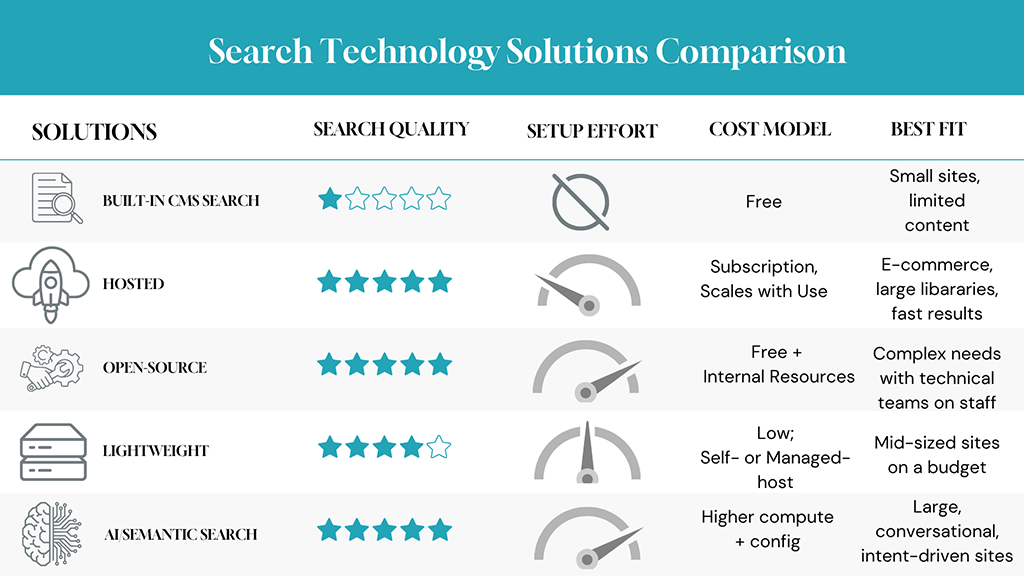
Comparing Your Search Technology Options at a Glance
| Solution | Search Quality | Setup Effort | Cost Model | Best Fit |
|---|---|---|---|---|
| Built-in CMS search | Basic | None | Free | Small sites, limited content |
| Hosted (e.g. Algolia) | Excellent | Low | Subscription, scales with use | E-commerce, large libraries, fast results |
| Open-source (Elasticsearch / OpenSearch) | Excellent, highly tunable | High | “Free” + infrastructure + engineering | Complex needs with technical teams |
| Lightweight (Typesense / Meilisearch) | Very good | Moderate | Low; self- or managed-host | Mid-sized sites on a budget |
| AI / semantic search | Best for intent | High | Higher compute + config | Large, conversational, intent-driven sites |
How to Choose
You don’t pick a search solution by finding the “best” one in the abstract, you pick it by being honest about your own situation. A few questions cut through most of the noise:
- How much does search actually drive your goals? If search is how visitors find products and convert, it deserves real investment. If it’s a convenience on a small site, the built-in box may be plenty. Match the spend to the stakes.
- How big and complex is your content? A few hundred items behaves very differently from a few hundred thousand. Scale is the single biggest factor in what you’ll need.
- What technical resources do you have? Be realistic. The most powerful option is the wrong one if no one on your team can run it, and a managed service that “costs more” can be far cheaper once you count engineering hours.
- How do your visitors actually search? If they type exact terms and product codes, keyword search shines. If they ask conversational questions, semantic search earns its keep.
There’s no universally correct answer, only the right fit for your content, your visitors, and your team. The mistake isn’t choosing the “wrong” tier, it’s not choosing at all, and letting a default search box quietly turn away the most motivated visitors you have.
Let’s Make Your Search Technology a Strength, Not a Default
The next step isn’t learning every feature of every platform, it’s mapping your goals, content scale, and team capacity to a short list of search technology options that actually fit. That’s where a trusted guide pays off. If you’re reevaluating search technology as part of a broader website or web application project, let’s chat so we can help your design, select, and implement the right solution.